Tuesday, July 28, 2009
Wednesday, February 4, 2009
FAX SERVICES:Send Fax From the Web
If you need to send a fax to someone, you don't need a fax machine or even fax software. Various free services let you send a free fax anywhere in the world. Some even capture faxes that others send to you and forward them to your email account as graphic files for later viewing. Try these:
eFax.com
http://www.efax.com
FreeFax
http://www.freefax.com.pk
ZipFax
http://www.zipfax.com
eFax.com
http://www.efax.com
FreeFax
http://www.freefax.com.pk
ZipFax
http://www.zipfax.com
Friday, January 9, 2009
Is My WebSite Down-ALert Me
Recently I was doing a little search on some tool that will help me keep an eye on the uptime of my freinds site. Doing some search i came across a very handy website
http://aremysitesup.com/
Are My Sites Up is a very simple service to help you keep an eye on your sites and warn you if they go down. It is completely free.
Sign up for an account, add your sites, and you are done. You can pop back to the site anytime to get a quick look at your sites. By default, you will be notified by email if any of your sites goes down. Optionally, you get an SMS text notification to your cell phone.
http://aremysitesup.com/
Are My Sites Up is a very simple service to help you keep an eye on your sites and warn you if they go down. It is completely free.
Sign up for an account, add your sites, and you are done. You can pop back to the site anytime to get a quick look at your sites. By default, you will be notified by email if any of your sites goes down. Optionally, you get an SMS text notification to your cell phone.
Friday, December 19, 2008
Source code auditing tool
Seeker Developer By Sunjester:
Seeker is a source code auditing tool capable of locating and finding bugs in any source code provided you have the right scanstring. seeker is developed in c# and utilizes the .NET framework.
Download Link:
http://devsun.info/projects/dbc/release.rar
Seeker is a source code auditing tool capable of locating and finding bugs in any source code provided you have the right scanstring. seeker is developed in c# and utilizes the .NET framework.
Download Link:
http://devsun.info/projects/dbc/release.rar
Wikto 2.1.0.0 (xmas Edition) Released
Wikto is a tool that checks for flaws in webservers. It provides much the same functionality as Nikto but adds various interesting pieces of functionality, such as a Back-End miner and close Google integration

Changelog
Fixed incorrect links spider bug
Added time anomaly functionality in backend scanner
Added easy access (and icons) to findings in backend scanner
Fixed .exe finding occasionally not showing bug
Click here to Download
Changelog
Fixed incorrect links spider bug
Added time anomaly functionality in backend scanner
Added easy access (and icons) to findings in backend scanner
Fixed .exe finding occasionally not showing bug
Click here to Download
Saturday, December 13, 2008
I Breath/ I Drunk
The latest weapon to tackle drunk driving has been unleashed in the United States,so it wont be logn before this useful gadget reaches our shores. Hail iBreath, a nifty little accesory that allows users and pub crawlers alike to check their blood alcohol content and see if they need to hail a cab to drive them home
The funky breathanalyser is the first device of its kind to be compatible with the ipod as well as the iphone.In India thought,the company service center doesn't have the foggiest idea of a launch date yet.
The device can measure an individual's blood alcohol range within 0.000-0.100 per cent, and can remind users when its time for their next breath test.
The iBreath has just gone on sale in Britain,and promises to give users an accurate reading of how much has been knocked back.The gadget clips on to the base of an iPod and has a fold-out tube to blow into.It workds in much the same way as a police breathanalyser does.The Unit which rather bizarrely also includes an FM radio, has been a pre-christmas hit in the US and is being touted as "the Ultimate IPod accessory". As a retalier says"Not only can this cool gizmo save you from career-ending embarassment,It can potentially save you a lot of money in legal fees and jail time".
Lets Drink to that
The funky breathanalyser is the first device of its kind to be compatible with the ipod as well as the iphone.In India thought,the company service center doesn't have the foggiest idea of a launch date yet.
The device can measure an individual's blood alcohol range within 0.000-0.100 per cent, and can remind users when its time for their next breath test.
The iBreath has just gone on sale in Britain,and promises to give users an accurate reading of how much has been knocked back.The gadget clips on to the base of an iPod and has a fold-out tube to blow into.It workds in much the same way as a police breathanalyser does.The Unit which rather bizarrely also includes an FM radio, has been a pre-christmas hit in the US and is being touted as "the Ultimate IPod accessory". As a retalier says"Not only can this cool gizmo save you from career-ending embarassment,It can potentially save you a lot of money in legal fees and jail time".
Lets Drink to that
Sunday, December 7, 2008
Password protect your messages with SMS guard

Many times we don’t want others to read our private messages but also don’t want to delete them. And there is no security setting in any nokia mobile to password protect messages.
Here is an app which will help you to keep your messages password protected.
You can download sms guard from link given below.
Click here to download
Install this software in your nokia s60 v2 mobile and open it.
At first it will ask for password to set. Enter the password and next time it will ask for the password to login.Log in using the password you set . Now you’ll be able to see all your inbox messages in this software. Now select the message you want to lock , click on options and select ‘Lock Message’.
Now nobody can see your private messages without your permission.
This software works with all symbian s60 v2 mobile phones ,N-gage QD and some n series phones.
e.g 6600, 3230, n70, n72, 7610, 6630, 6670
Get Gmail On Your Desktop
Google recently developed a Google Desktop Gadget known as Gmail Gadget. Just log into your account and this gadget will fetch your mails in your desktop. You can easily mail, send replies, from your desktop with this gadget. This is the fastest method to search Gmail !
Download Instructions :Click here to Download
Download Instructions :Click here to Download
Thursday, November 20, 2008
Etherpad-Better than GoogleDocs ?
Just came to know about a new tool launched by Appjet known as Etherpad well definately its a revolution and something new some may argue that there are other similar tools like SubEthaEdit but its for MAC and its paid Etherpad is free maybe not so reliable but it does offer something new if many people want to simultaneously want to edit many things
You can try yourself Etherpad at
http://etherpad.com/
You can try yourself Etherpad at
http://etherpad.com/
Monday, November 17, 2008
Prevent Virus Spreading From USB Flash Drives With iKill
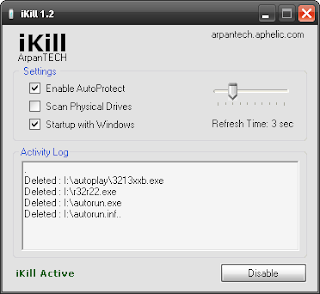
Here is a simple tool known as iKill which prevents the spreading of viruses from Pen Drive to your PC.
It works by scanning the drives for the presence of removable drives. If found, it parses the autorun.inf file for the executables it may run. If AutoProtect is enabled,it will automatically delete the files present on the drive. Otherwise, it will prompt you for your permission to delete the virus. Version 2 includes unspecified updates.
Download
Saturday, November 15, 2008
Save youtube videos directly from Firefox3 cache
Open the youtube video page in firefox 3. Allow the video to play once.
Now the video is finished playing. Open a new tab in firefox 3. In the location bar (address bar) type
about:cache
and press enter. A new page will load. In the page see the heading
Disk cache device
Under that there is “Cache Directory”. There will be a long address similar to one shown below
C:\Documents and Settings\usrname\Local Settings\Application Data\Mozilla\Firefox\Profiles\abcd123h.default\Cache
Copy the full address (You must copy the cache link address from your computer. The above address is just to show and make you understand). Now open “My Computer”. In the address bar paste the already copied long address.
A folder will open. This folder contains the youtube video file in the form of cache. Note that the video file will be big in size. Now open VLC Media player or any other flv player. Drag and drop the bigger cache file in the media player. The file that plays the video is your video file. Copy and paste it in desktop. Rename the file to yourvideo1.flv (or any other name of your choice with flv extension).
Now you have saved the youtube video right from your firefox 3 cache rather than downloading it again.
You can watch the saved video while offline.
Tested in WinXP, Firefox3
Now the video is finished playing. Open a new tab in firefox 3. In the location bar (address bar) type
about:cache
and press enter. A new page will load. In the page see the heading
Disk cache device
Under that there is “Cache Directory”. There will be a long address similar to one shown below
C:\Documents and Settings\usrname\Local Settings\Application Data\Mozilla\Firefox\Profiles\abcd123h.default\Cache
Copy the full address (You must copy the cache link address from your computer. The above address is just to show and make you understand). Now open “My Computer”. In the address bar paste the already copied long address.
A folder will open. This folder contains the youtube video file in the form of cache. Note that the video file will be big in size. Now open VLC Media player or any other flv player. Drag and drop the bigger cache file in the media player. The file that plays the video is your video file. Copy and paste it in desktop. Rename the file to yourvideo1.flv (or any other name of your choice with flv extension).
Now you have saved the youtube video right from your firefox 3 cache rather than downloading it again.
You can watch the saved video while offline.
Tested in WinXP, Firefox3
Saturday, September 13, 2008
Google Chrome Easter Egg Revealed
Just type about:internets on the Google chrome address bar, you will find images of animated colorful tubes.

These tubes are known as “Series of Tubes”
“Series of tubes” is an analogy used by U.S Senator Ted Stevens to describe the Internet in the context of Network Neutrality.
You can also try:
about:version
about:memory
about:stats
about:network
about:dns
about:cache
about:histograms
about:plugins
These tubes are known as “Series of Tubes”
“Series of tubes” is an analogy used by U.S Senator Ted Stevens to describe the Internet in the context of Network Neutrality.
You can also try:
about:version
about:memory
about:stats
about:network
about:dns
about:cache
about:histograms
about:plugins
Tuesday, September 2, 2008
How to hide your Java code to prevent from being decompiled
Decompilation is the process of turning object code into source code. This should make sense, since compilation is the process of turning source code into object code. But what is object code? Roughly defined, object code is code expressed in a language that is executed directly by a real or virtual machine. For languages like C, the object code is generally run on a hardware CPU, while Java object code generally runs on a virtual machine.
As described above, decompilation may sound fairly simple, but it's actually quite hard -- it essentially involves inferring large-scale, high-level behavior from small-scale, low-level behavior. To understand this intuitively, think of a computer program as a complex corporate structure. High-level managers dispense commands such as "maximize technology throughput" to their underlings, who then turn these commands into more concrete actions, such as installing the new XML database.
As a new employee at this corporation, you might ask an underling what he or she was doing, and get the response, "I'm installing a new XML database." From that statement, you wouldn't be able to infer that the final goal was to maximize technology throughput. After all, the ultimate goal could be something quite different, such as discretizing the supply chain structure or aggregating consumer data.
But if you were the curious type, you might ask a few more questions, and you might spread your questions around, asking several underlings at different levels of the company. Eventually, you could put all the answers together and you might be able to guess that the larger corporate goal was to maximize technology throughput.
If you think of a computer program working like a corporate structure, then the above analogy should give you an intuitive sense of why decompiling code isn't trivial. For a more theoretical perspective, here's how Cristina Cifuentes, a leading researcher in the area, describes the process of decompilation:
Any binary reengineering project requires the disassembly of the code stored in the binary file. From a theoretical point of view, the separation of data and code in von Neumann machines is equivalent to the halting problem; hence, a complete static translation is not possible. However, in practice, different techniques can be used to increase the percentage of code that is translated statically, or hooks to dynamic translation techniques can be used at run-time.
--"Binary Reengineering of Distributed Object Technology"
Turning object code into source code isn't the only issue at hand when it comes to decompilation. A Java class file potentially contains a number of different kinds of information. Knowing what kind of information a class file might contain is important to understanding what you can do with, and to, that information. And that's where a Java disassembler comes in.
The actual binary format of the Java class file isn't important. What is important is knowing what different pieces of information are contained in those bytes. To this end, we'll employ a tool that comes with most JDKs -- javap. javap is a Java code disassembler, which is not the same as a decompiler. A disassembler turns object code that is in a machine-readable format (as shown in Listing 1) into something human-readable (as shown in Listing 2).
0000000 feca beba 0300 2d00 4200 0008 081f 3400
0000020 0008 073f 2c00 0007 0735 3600 0007 0737
0000040 3800 0007 0a39 0400 1500 000a 0007 0a15
0000060 0800 1600 000a 0008 0a17 0800 1800 0009
...
Output of javapLocal variables for method void priv(int)
Foo this pc=0, length=35, slot=0
int argument pc=0, length=35, slot=1
Method void main(java.lang.String[])
0 new #4
3 invokespecial #10
6 return
Note that the output shown in Listing 2 isn't quite source code. The first half of the listing is a list of local variables for a method; the second half is assembly code, which is human-readable object code.
javap is used to disassemble, or unpack, a class file. Here's a quick run-down of the information contained in a Java class file, which can be disassembled using javap:
Member variables. Every class file contains all the naming and typing information for each data member of its class.
Disassembled methods. Each method of the class is represented, along with its type signature, by a string of virtual machines instructions.
Line number. Each section of each method is mapped to the source code line that it was generated from (when possible). This provides the run-time system, and debuggers, the ability to provide a stack trace for a running program.
Local variable names. The variables local to a method don't really need names once the methods are compiled, but they can be included using the -g option to the javac compiler. These, too, help the run-time system and the debugger to help you.
Now that we know a little bit about what's going on inside a Java class file, let's take a look as how we can tweak this information to our own ends.
Conceptually, using a decompiler is easy. It's the inverse of a compiler: you give it a .class file, and it gives you a source code file.
Some of the newer decompilers have intricate graphical interfaces, but we'll use Mocha, which was the first publicly available decompiler, for our initial examples. At the end of this article, I'll discuss JODE, one of the newer decompilers available under the GPL. (See Resources to download Mocha and for a list of Java decompilers.)
Let's say you have a class file called Foo.class sitting in your directory. Decompiling it with Mocha is as easy as typing the following command:
$ java mocha.Decompiler Foo.class
This produces a new file, called Foo.mocha (Mocha applies the name Foo.mocha to avoid overwriting any source code in the original file). The new file is a Java source file, and assuming all went well you can now compile it normally. Just rename it to Foo.java and go.
But there's a hitch: if you run Mocha on some code you have lying around, you may notice that the code it generates isn't identical to the source. I'll run an example so that you can see what I mean. The original source shown in Listing 3 is from a test program called Foo.java.
private int member = 10;
public Foo() {
int local = returnInteger();
System.out.println( "foo constructor" );
priv( local );
}
And here's the code generated by Mocha.
private int member;
public Foo()
{
member = 10;
int local = returnInteger();
System.out.println("foo constructor");
priv(local);
}
The two snippets differ in where the member variable member is initialized to 10. In the original source, it's expressed as an initial value on the same line as the declaration; in the decompiled source, it's expressed as an assignment statement inside the constructor. The decompiled code tells us something about the way the original source was compiled; namely that its initial values were compiled as assignments in the constructor. You can learn a lot about the way Java compilers work by looking at decompilations of their output.
As valiantly as Mocha works to decompile your object code, it doesn't always succeed. No decompiler is able to render the source with complete accuracy, due to the difficulty of the problem, and every decompiler handles the holes in its rendering differently. For example, Mocha sometimes has trouble figuring out the exact structure of looping constructs. When this happens, it resorts to using fake goto statements in the resulting output, as shown in Listing 5.
if (i1 == i3) goto 214 else 138;
j3 = getSegment(i3).getZOrder();
if (j1 != 1) goto 177 else 154;
if (j3 > k2 && (!k1 || j3 <> j2)) goto 203 else 196;
expression 0
if == goto 201
continue;
Code obfuscation is literally the act of obscuring your code. A Java obfuscator changes a program in subtle ways, such that it behaves identically as far as the JVM is concerned, but is more confusing to the human trying to understand it.
Let's look at a sample of what happens when a decompiler runs up against obfuscated code. Listing 6 shows the result of Mocha's attempt to decompile Java code that had been obfuscated by a tool called jmangle. Note that the snip below is the same one we've used in the previous listings, though you certainly wouldn't think so at first glance.
public Foo()
{
jm2 = 10;
int i = jm0();
System.out.println("foo constructor");
jm1(i);
}
An obfuscator such as jmangle changes many of the variable and method names (and sometimes even class and package names) into meaningless strings. This results in a program that is difficult for humans to read, but which is essentially the same as the original as far as the JVM is concerned.
All obfuscators make symbols meaningless, but that's not all they do. Crema was notorious for the many nasty ways it could foil decompilation, and many of the obfuscators that have been created since then have followed its lead.
One popular way to obscure source is to take the meaningless-string trick to the next level, by replacing a symbol from the class file with an illegal string. The replacement might be a keyword like private, or, even worse, a completely meaningless symbol such as ***. Some virtual machines -- especially in browsers -- don't take kindly to such antics. Technically, a variable such as = is contrary to the Java specification; some virtual machines will overlook it, others will not.
Another one of Crema's tricks was, literally, the bomb. Crema was armed with the ability to completely shut Mocha down. It did so by adding a little "bomb" to the compiled code, which caused Mocha to crash when it attempted to decompile the code.
Sadly, Crema is no longer available, but a tool called HoseMocha, like Crema, was designed specifically to shut Mocha down. To see how HoseMocha works, we'll use our trusty disassembler, javap. Listing 7 shows the code before HoseMocha has planted its bomb.
Method void main(java.lang.String[])
0 new #4
3 invokespecial #10
6 return
And here's the code after HoseMocha has had its way with it.
Method void main(java.lang.String[])
0 new #4
3 invokespecial #10
6 return
7 pop
Do you see the bomb? Note that the routine now has a pop instruction after the return. But wait -- how can a function do something after it's returned? Obviously, it can't, and that's the trick. Placing an instruction after a return statement ensures that it will never be executed. What you see here is essentially impossible to decompile. It doesn't make any sense because it doesn't correspond to any possible Java source code.
But why does this little glitch cause Mocha to crash? It could just as easily ignore it, or send a warning and move on. While Mocha's vulnerability to this type of bomb could be considered a bug, it's more likely that it was deliberately created by van Vliet in response to all the concern about Mocha.
So far, we've looked at older decompilation and obfuscation tools -- oldies but goodies. But such tools have become increasingly sophisticated over the years, particularly with regard to graphical interface. We'll close with a look at one of the newer decompilers, just to give you an idea of what's out there.
i2 = i3;
Mocha's struggles aside, decompilers generally render source fairly accurately. Once you know a decompiler's weaknesses, you can manually analyze and tweak the decompiled code to come up with a fairly accurate representation of the original. Add to that the fact that decompilers are getting better all the time, and we have a bit of a problem: What if you don't want anyone to be able to decompile your code?
Not only have decompilation and obfuscation techniques become more intricate over the past five years, but the interfaces to them are becoming increasingly slick. Several of the more recent decompilers let you browse through a directory of .class files and decompile them with a single click.
JODE (Java Optimize and Decompile Environment) is one such program. Type the name of a .jar file into the command line and JODE will allow you to graphically browse its classes, automatically decompiling each class for you to see. This is particularly useful for looking through the source code to libraries supplied with your Java SDK. Simply type in the following command:
$ java jode.swingui.Main --classpath [path to your Java SDK]/jre/lib/rt.jar
And you'll get a nice, smooth rendering of the file, as shown in Figure 1.

Sunday, August 31, 2008
Saturday, August 16, 2008
Cool Firefox Tricks That Might Make You Crazy
Some Cool Firefox Tricks That Might Make You Crazy!!
* chrome://browser/content/browser.xul :: Opens another Firefox inside a tab in the the existing Firefox window.
* chrome://browser/content/preferences/preferences.xul :: Opens the Options dialog box inside the Firefox tab.
* chrome://browser/content/bookmarks/bookmarksPanel.xul :: Opens the “Book Marks Manager” inside a tab in the Firefox window.
* chrome://browser/content/history/history-panel.xul :: Opens the History Panel in the Firefox tab.
* chrome://mozapps/content/extensions/extensions.xul?type=extensions :: Opens the Extensions window in the current tab.
* chrome://browser/content/preferences/cookies.xul :: Opens the “cookies window” inside a tab in the Firefox window.
* chrome://browser/content/preferences/sanitize.xul :: Opens the “Clear Private Data” window inside the current tab.
* chrome://browser/content/aboutDialog.xul :: Opens the “About Firefox” Dialog box inside the tab.
* chrome://browser/content/credits.xhtml :: A scrolling list of names. The one’s who we must thank for creating Firefox
And My favorite
* chrome://global/content/alerts/alert.xul :: Dancing Firefox.
* chrome://browser/content/browser.xul :: Opens another Firefox inside a tab in the the existing Firefox window.
* chrome://browser/content/preferences/preferences.xul :: Opens the Options dialog box inside the Firefox tab.
* chrome://browser/content/bookmarks/bookmarksPanel.xul :: Opens the “Book Marks Manager” inside a tab in the Firefox window.
* chrome://browser/content/history/history-panel.xul :: Opens the History Panel in the Firefox tab.
* chrome://mozapps/content/extensions/extensions.xul?type=extensions :: Opens the Extensions window in the current tab.
* chrome://browser/content/preferences/cookies.xul :: Opens the “cookies window” inside a tab in the Firefox window.
* chrome://browser/content/preferences/sanitize.xul :: Opens the “Clear Private Data” window inside the current tab.
* chrome://browser/content/aboutDialog.xul :: Opens the “About Firefox” Dialog box inside the tab.
* chrome://browser/content/credits.xhtml :: A scrolling list of names. The one’s who we must thank for creating Firefox
And My favorite
* chrome://global/content/alerts/alert.xul :: Dancing Firefox.
Tuesday, August 12, 2008
Get your orkut scraps delivered to your mobile
This article provides you with a very simple method to get orkut scraps delivered directly into your mobile phone as sms messages. The pages you may subscribe are scrapbook, community pages or even community messages. All the messages will be delivered free of cost. Following are the steps to get any orkut page as sms to mobile :
Register your mobile phone to MyToday. MyToday supports almost all networks in India.
Login to your orkut account and navigate to the page to which you wish to subscribe.
Copy the URL of the above page. It should be copied completely including http://. URL can be found in the address bar (where you enter www.orkut.com) of your browser.
In other window/ tab, open the orkutfeeds site and in the field provided, paste the above orkut URL and click on subscribe.
Now, copy the URL of subscription page as said above.
Open your MyToday account, and navigate to a page as seen in the snap in the following way.
a. Under My tab, click on feeds.
b. Under My Folders, click on Manage feeds.
c. Under Folders tab, click on SMS.
d. You will now get into a page.
Enter the name as you wish. Say, “My scraps” and at the URL field, paste the URL which you have copied from orkutfeeds subscription page, check Send SMS, click Create.
You’re done! Now, you can expect your scraps delivered into your mobile phone as and when your scrapbook updates.
You may use following methods to get your scrap directed to your mobile phone.
1. Determine your cell phone’s email id and use RSSFWD to send scrapbook feed updates to your mobile phone. Easiest way to determine your mobile phone’s email id is to send an email from your cell phone to your mail id (it costs you ) and look for from address in mail. In RSSFWD, you need to enter your cell phone’s mail id instead of your email id.
2. Yahoo! Alerts:
This is quite simple, you need to register your mobile for Yahoo! Mobile or Yahoo! Messenger. Goto Yahoo! Alerts page for feeds. Enter the feed url for your orkut scrapbook and select your mobile device to receive alerts. This trick did not work for me when I used my messenger phone (Spice, Karnataka, India.) to receive alerts. My network is compatible with messenger but did not work for alerts. For detailed description of using Yahoo! Alerts, I recommend you reading this post.
3. We have few more sites like SendMeRss or MyToday(India) or any other applicable for your geographic location. Just use the same trick, use the feed generated by orkut feeds and subscribe to that using any services like the ones above mentioned. Or use your cell phone’s email address and signup for that mail notification.
Register your mobile phone to MyToday. MyToday supports almost all networks in India.
Login to your orkut account and navigate to the page to which you wish to subscribe.
Copy the URL of the above page. It should be copied completely including http://. URL can be found in the address bar (where you enter www.orkut.com) of your browser.
In other window/ tab, open the orkutfeeds site and in the field provided, paste the above orkut URL and click on subscribe.
Now, copy the URL of subscription page as said above.
Open your MyToday account, and navigate to a page as seen in the snap in the following way.
a. Under My tab, click on feeds.
b. Under My Folders, click on Manage feeds.
c. Under Folders tab, click on SMS.
d. You will now get into a page.
Enter the name as you wish. Say, “My scraps” and at the URL field, paste the URL which you have copied from orkutfeeds subscription page, check Send SMS, click Create.
You’re done! Now, you can expect your scraps delivered into your mobile phone as and when your scrapbook updates.
You may use following methods to get your scrap directed to your mobile phone.
1. Determine your cell phone’s email id and use RSSFWD to send scrapbook feed updates to your mobile phone. Easiest way to determine your mobile phone’s email id is to send an email from your cell phone to your mail id (it costs you ) and look for from address in mail. In RSSFWD, you need to enter your cell phone’s mail id instead of your email id.
2. Yahoo! Alerts:
This is quite simple, you need to register your mobile for Yahoo! Mobile or Yahoo! Messenger. Goto Yahoo! Alerts page for feeds. Enter the feed url for your orkut scrapbook and select your mobile device to receive alerts. This trick did not work for me when I used my messenger phone (Spice, Karnataka, India.) to receive alerts. My network is compatible with messenger but did not work for alerts. For detailed description of using Yahoo! Alerts, I recommend you reading this post.
3. We have few more sites like SendMeRss or MyToday(India) or any other applicable for your geographic location. Just use the same trick, use the feed generated by orkut feeds and subscribe to that using any services like the ones above mentioned. Or use your cell phone’s email address and signup for that mail notification.
Tuesday, August 5, 2008
Finding and Ripping Template Monsters
Tools Needed:
-Browser with Google opened
-Black Widow Program v5.21 or Higher
http://rapidshare.com/files/63746479/BlackWidow5.21.rar
-Winrar
The process:
1. Open your browser up to Google.com
2. Paste one of the following lines into the search bar. Then hit enter.
-inurl:htm -inurl:html -inurl:asp intitle:"index of" +(*-b.jpg) +screenshots
-inurl:htm -inurl:html -inurl:asp intitle:"index of" +(psd) +sources
-inurl:htm -inurl:html -inurl:asp intitle:"index of" +(psd) +source
-inurl:htm -inurl:html -inurl:asp intitle:"index of" +(psd) +With_fl
-inurl:htm -inurl:html -inurl:asp intitle:"index of" +(psd) +site_flash
-inurl:htm -inurl:html -inurl:asp intitle:"index of" +(psd) +b.jpg
3. Now you will see a bunch of index's returned. This means the people were dumb and uploaded their whole Template, PSD's and all and didn't even have an index.html or index.php. Not everything returned is going to be a Template Monster Template. About 2/3 of them will be either garbage and not work, or some other random templates they made for their site. However you can easily tell the difference by the Google Description. If there is a 4-5 digit number like my example picture below (5622), then its probably a Template Monster.
4. Hit Parent Directory until you see folders like: "Sources, PSD, Screenshots, ClipArt, Flash, or Fonts. This is usually the main directory for that Template Monster. Copy and paste the URL from your browser into the BlackWidow Program. Once you paste it in there, hit enter and the site will load in the BlackWidow using IE. Now Click on the Structure Tab and Hit Scan at the top. Scanning should take 2-3min. If it takes any longer, its probably done and you can just hit stop and stop it manually.
5. Once its done scanning, Go back to the structure tab, and it has the whole site laid out. Now just highlight the folder right under the http:// folder on the left side and hit the download button.

6. A download menu will now come open. Download it to a any folder. However make sure your check boxes on the right are the same as mine below.

7. For some reason BlackWidow Downloads some useless junk files. You can easily delete them. All the files pictured below are garbage and can be done away with. Its probably best to keep all other files unless you know what your doing.

8. Now just rename the folder it made from the url to the TM # and zip or rar it up using Winrar.
-Browser with Google opened
-Black Widow Program v5.21 or Higher
http://rapidshare.com/files/63746479/BlackWidow5.21.rar
-Winrar
The process:
1. Open your browser up to Google.com
2. Paste one of the following lines into the search bar. Then hit enter.
-inurl:htm -inurl:html -inurl:asp intitle:"index of" +(*-b.jpg) +screenshots
-inurl:htm -inurl:html -inurl:asp intitle:"index of" +(psd) +sources
-inurl:htm -inurl:html -inurl:asp intitle:"index of" +(psd) +source
-inurl:htm -inurl:html -inurl:asp intitle:"index of" +(psd) +With_fl
-inurl:htm -inurl:html -inurl:asp intitle:"index of" +(psd) +site_flash
-inurl:htm -inurl:html -inurl:asp intitle:"index of" +(psd) +b.jpg
3. Now you will see a bunch of index's returned. This means the people were dumb and uploaded their whole Template, PSD's and all and didn't even have an index.html or index.php. Not everything returned is going to be a Template Monster Template. About 2/3 of them will be either garbage and not work, or some other random templates they made for their site. However you can easily tell the difference by the Google Description. If there is a 4-5 digit number like my example picture below (5622), then its probably a Template Monster.
4. Hit Parent Directory until you see folders like: "Sources, PSD, Screenshots, ClipArt, Flash, or Fonts. This is usually the main directory for that Template Monster. Copy and paste the URL from your browser into the BlackWidow Program. Once you paste it in there, hit enter and the site will load in the BlackWidow using IE. Now Click on the Structure Tab and Hit Scan at the top. Scanning should take 2-3min. If it takes any longer, its probably done and you can just hit stop and stop it manually.
5. Once its done scanning, Go back to the structure tab, and it has the whole site laid out. Now just highlight the folder right under the http:// folder on the left side and hit the download button.

6. A download menu will now come open. Download it to a any folder. However make sure your check boxes on the right are the same as mine below.
7. For some reason BlackWidow Downloads some useless junk files. You can easily delete them. All the files pictured below are garbage and can be done away with. Its probably best to keep all other files unless you know what your doing.
8. Now just rename the folder it made from the url to the TM # and zip or rar it up using Winrar.


Sunday, August 3, 2008
How To Make Your Own Radio Station
Must HAVE Winamp (Any Version)
First, things First your speed has to be at least 256/64 kbps (which means Dial-up users, will have alot of latency, just dnt bother)
Second, your going to have to have a domain, an updated one with the current i.p active. (Could be anything e.g. My sig)
Now, Your gonna have to download the Shoutcast Files.
Go to www.shoutcast.com to get the files.
Ok After downloading these, installing Both of them in any order i dnt care. Go to START>PROGRAM FILES>SHOUTcast DNAS>EDIT SHOUTCAST DNS CONFIG.
Ok your gonna have to Configure it:
Go Down and where it says password: change (that means your gonna have to change it to whatever, make sure u remember)
The Portbase: change it to whatever port you want it
Maxusers: (lets be realistic here, dnt put in 10000, like NXS's radio station) your bandwidth has to be extremely good, if your cable, 50 user max is ok, ADSL should stay below 10 users, and T1 connections should do whatever tickles there fantasy.
Open winamp, RIGHT CLICK>OPTIONS>PREFRENCES>DSP EFFECT> and choose the NULLSOFT SHOUTCAST.
Go to OUTPUT, and then click on Connection, Through the ADDRESS, type your address which you have done through www.no-ip.com, PORT NUMBER, whatever u did in the EDIT.txt, and your password.
Then go to Encoder, and choose your quality of your music. Go back to OUTPU>OUTPUT CONFIG> YELLOW PAGES. this is your advertisemant information. dow hatever you like there.
Now Connect. to check that your Radio os on-line go to http://(your address that you added in the prefrence)
First, things First your speed has to be at least 256/64 kbps (which means Dial-up users, will have alot of latency, just dnt bother)
Second, your going to have to have a domain, an updated one with the current i.p active. (Could be anything e.g. My sig)
Now, Your gonna have to download the Shoutcast Files.
Go to www.shoutcast.com to get the files.
Ok After downloading these, installing Both of them in any order i dnt care. Go to START>PROGRAM FILES>SHOUTcast DNAS>EDIT SHOUTCAST DNS CONFIG.
Ok your gonna have to Configure it:
Go Down and where it says password: change (that means your gonna have to change it to whatever, make sure u remember)
The Portbase: change it to whatever port you want it
Maxusers: (lets be realistic here, dnt put in 10000, like NXS's radio station) your bandwidth has to be extremely good, if your cable, 50 user max is ok, ADSL should stay below 10 users, and T1 connections should do whatever tickles there fantasy.
Open winamp, RIGHT CLICK>OPTIONS>PREFRENCES>DSP EFFECT> and choose the NULLSOFT SHOUTCAST.
Go to OUTPUT, and then click on Connection, Through the ADDRESS, type your address which you have done through www.no-ip.com, PORT NUMBER, whatever u did in the EDIT.txt, and your password.
Then go to Encoder, and choose your quality of your music. Go back to OUTPU>OUTPUT CONFIG> YELLOW PAGES. this is your advertisemant information. dow hatever you like there.
Now Connect. to check that your Radio os on-line go to http://(your address that you added in the prefrence)
Saturday, August 2, 2008
Changing Fraud Money to Real Money
More and more people nowadays get hacked CCs (Credit Cards), Paypals etc. However, what many don’t know is that they can actually cash out the fraud money, instead of just buying real life items, shipping it to their house and selling it. A very fast method would be as suggested.
Join this game*/Download it/ Go to it http://secondlife.com
Put fake info + your CC
Under Linden (Game Currency), Buy Linden Dollars, Click Transfer Linden Money to paypal
*Note: This is an ADULT game, meaning if you are under 18, it is not suggested you download this.
That’s all there is! Simply wait a few days, get legit paypal cash. (Advised not to do over 100 USD a day, and not to cash out the money immediately after your recieved it)
Optional (Safety Tips):
Purposely lose, gain cash to yourself/friends, to make the entire process seem more believable.
If you are losing cash to yourself, use PROXIES
Try to get the money OUT of the paypal as soon as possible
Source:Unkn0wn.eu
Join this game*/Download it/ Go to it http://secondlife.com
Put fake info + your CC
Under Linden (Game Currency), Buy Linden Dollars, Click Transfer Linden Money to paypal
*Note: This is an ADULT game, meaning if you are under 18, it is not suggested you download this.
That’s all there is! Simply wait a few days, get legit paypal cash. (Advised not to do over 100 USD a day, and not to cash out the money immediately after your recieved it)
Optional (Safety Tips):
Purposely lose, gain cash to yourself/friends, to make the entire process seem more believable.
If you are losing cash to yourself, use PROXIES
Try to get the money OUT of the paypal as soon as possible
Source:Unkn0wn.eu
Subscribe to:
Posts (Atom)

 Posts
Posts

