Google

Friday, December 19, 2008

Wikto 2.1.0.0 (xmas Edition) Released

Wikto is a tool that checks for flaws in webservers. It provides much the same functionality as Nikto but adds various interesting pieces of functionality, such as a Back-End miner and close Google integration

Wikto

Changelog

Fixed incorrect links spider bug
Added time anomaly functionality in backend scanner
Added easy access (and icons) to findings in backend scanner
Fixed .exe finding occasionally not showing bug

Click here to Download

Saturday, December 13, 2008

I Breath/ I Drunk

The latest weapon to tackle drunk driving has been unleashed in the United States,so it wont be logn before this useful gadget reaches our shores. Hail iBreath, a nifty little accesory that allows users and pub crawlers alike to check their blood alcohol content and see if they need to hail a cab to drive them home

The funky breathanalyser is the first device of its kind to be compatible with the ipod as well as the iphone.In India thought,the company service center doesn't have the foggiest idea of a launch date yet.

The device can measure an individual's blood alcohol range within 0.000-0.100 per cent, and can remind users when its time for their next breath test.

The iBreath has just gone on sale in Britain,and promises to give users an accurate reading of how much has been knocked back.The gadget clips on to the base of an iPod and has a fold-out tube to blow into.It workds in much the same way as a police breathanalyser does.The Unit which rather bizarrely also includes an FM radio, has been a pre-christmas hit in the US and is being touted as "the Ultimate IPod accessory". As a retalier says"Not only can this cool gizmo save you from career-ending embarassment,It can potentially save you a lot of money in legal fees and jail time".
Lets Drink to that

Sunday, December 7, 2008

Password protect your messages with SMS guard


Many times we don’t want others to read our private messages but also don’t want to delete them. And there is no security setting in any nokia mobile to password protect messages.

Here is an app which will help you to keep your messages password protected.

You can download sms guard from link given below.

Click here to download

Install this software in your nokia s60 v2 mobile and open it.

At first it will ask for password to set. Enter the password and next time it will ask for the password to login.Log in using the password you set . Now you’ll be able to see all your inbox messages in this software. Now select the message you want to lock , click on options and select ‘Lock Message’.

Now nobody can see your private messages without your permission.

This software works with all symbian s60 v2 mobile phones ,N-gage QD and some n series phones.

e.g 6600, 3230, n70, n72, 7610, 6630, 6670

Get Gmail On Your Desktop

Google recently developed a Google Desktop Gadget known as Gmail Gadget. Just log into your account and this gadget will fetch your mails in your desktop. You can easily mail, send replies, from your desktop with this gadget. This is the fastest method to search Gmail !


Download Instructions :Click here to Download

Thursday, November 20, 2008

Etherpad-Better than GoogleDocs ?

Just came to know about a new tool launched by Appjet known as Etherpad well definately its a revolution and something new some may argue that there are other similar tools like SubEthaEdit but its for MAC and its paid Etherpad is free maybe not so reliable but it does offer something new if many people want to simultaneously want to edit many things
You can try yourself Etherpad at
http://etherpad.com/

Monday, November 17, 2008

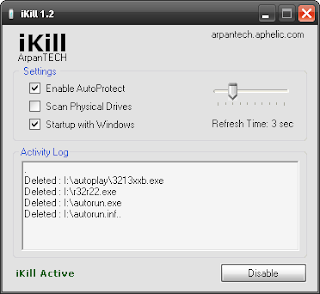
Prevent Virus Spreading From USB Flash Drives With iKill


Here is a simple tool known as iKill which prevents the spreading of viruses from Pen Drive to your PC.

It works by scanning the drives for the presence of removable drives. If found, it parses the autorun.inf file for the executables it may run. If AutoProtect is enabled,it will automatically delete the files present on the drive. Otherwise, it will prompt you for your permission to delete the virus. Version 2 includes unspecified updates.

Download

Saturday, November 15, 2008

Save youtube videos directly from Firefox3 cache

Open the youtube video page in firefox 3. Allow the video to play once.

Now the video is finished playing. Open a new tab in firefox 3. In the location bar (address bar) type
about:cache

and press enter. A new page will load. In the page see the heading

Disk cache device

Under that there is “Cache Directory”. There will be a long address similar to one shown below

C:\Documents and Settings\usrname\Local Settings\Application Data\Mozilla\Firefox\Profiles\abcd123h.default\Cache


Copy the full address (You must copy the cache link address from your computer. The above address is just to show and make you understand). Now open “My Computer”. In the address bar paste the already copied long address.

A folder will open. This folder contains the youtube video file in the form of cache. Note that the video file will be big in size. Now open VLC Media player or any other flv player. Drag and drop the bigger cache file in the media player. The file that plays the video is your video file. Copy and paste it in desktop. Rename the file to yourvideo1.flv (or any other name of your choice with flv extension).

Now you have saved the youtube video right from your firefox 3 cache rather than downloading it again.

You can watch the saved video while offline.

Tested in WinXP, Firefox3